
We hope everyone had a fun and refreshing Spring Break! We return to Milwood Magnet School with a renewed focus to educate and learn. Before we left, our 8th Grade A&B teams went on a Gear-Up field trip to Western Michigan University. Students were able to explore the campus via a tour, where they saw everything from the Waldo Library, to a realistic dorm room, to a taste of campus life by having a lunch in a WMU cafeteria.
Students walked away from the experience knowing more about college than they did before the visit and had an idea of the preparations they would need to make in order to be ready for college. They were also able to get more information on what the Kalamazoo Promise will pay for in regards to college, as well.
Showing posts with label slideshow. Show all posts
Showing posts with label slideshow. Show all posts
Monday, April 13, 2009

Tuesday, December 16, 2008
Tech Tuesday: Using the Drawing Toolbar in MS Word
Did you know that you can use the drawing toolbar in MS Word to do many things? You can also use this toolbar in other Microsoft Office programs, such as PowerPoint, but this slideshow focuses on MS Word for consistency.
Tuesday, December 9, 2008
Tech Tuesday: Microsoft Photo Story 3
This week's Tech Tuesday was a recap on the original session that taught Photo Story 3. Due to popular request, the class was offered once again. Please view the slideshow for a closer look at what was taught.
Wednesday, November 19, 2008
Q&A: Uglies in the Curriculum
How has The Uglies helped to reinforce the biotechnology curriculum?
Mr. Koch's 7th Grade Science class completed their final project for Unit 1: Technological Innovations by designing several of the technologies available to the characters in The Uglies by Scott Westerfeld. Students were graded on several different aspects of the project, including the amount of detail, the quality, the color, and the labels they used in order to describe their technology and how it worked. Please be sure to check out the sample of projects!
This is a list of items and the page numbers where they were described in the book:
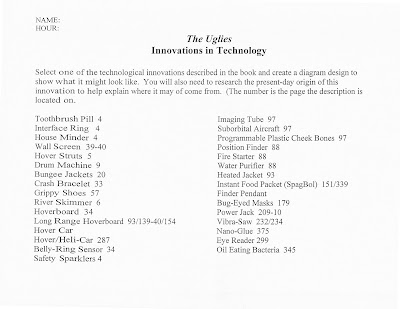
Mr. Koch's 7th Grade Science class completed their final project for Unit 1: Technological Innovations by designing several of the technologies available to the characters in The Uglies by Scott Westerfeld. Students were graded on several different aspects of the project, including the amount of detail, the quality, the color, and the labels they used in order to describe their technology and how it worked. Please be sure to check out the sample of projects!
This is a list of items and the page numbers where they were described in the book:
Tuesday, November 18, 2008
Technology Tuesday: MS PowerPoint
Technology Tuesday recap for our session on using MS PowerPoint:
There is also a PowerPoint brochure viewable via Acrobat Reader that offers step-by-step instructions on how to do many of the things discussed during our Tech Tuesday session.
There is also a PowerPoint brochure viewable via Acrobat Reader that offers step-by-step instructions on how to do many of the things discussed during our Tech Tuesday session.
Subscribe to:
Posts (Atom)
